

Specialized LG Appliance Repair in San Francisco
Mon–Sat: 8:00 AM – 7:00 PM
The model number decides parts, procedures and what a technician brings. This guide shows where the label usually sits on each kind of LG appliance.
Two LG refrigerators can look identical from the front and still use different fans, boards and sensors. The model number is how a technician tells them apart. Giving it when you book means the right information is on hand before anyone arrives, and it keeps a diagnosis from stalling on a question you could have answered at the start.
The data plate is a printed or etched sticker or plate with a few lines of text. It lists a model number, a serial number and electrical or gas information. LG model numbers are a mix of letters and digits, and they may be followed by suffixes that mark color or minor variations. Copy the entire string, including any characters after a period or slash. A photo is the safest way to do this, because it avoids transposed letters.
Locations vary by year and design, so treat these as the usual places, not rules.
Look on the inside wall of the fresh-food compartment, near the top or along the side, and on the door frame edge. French-door and side-by-side models often hold the label on the interior wall. Pull out a shelf or a crisper drawer if one covers it. Top-freezer designs sometimes carry it on the inside ceiling or side wall; examples include LT13C2000 and LBNC12231.
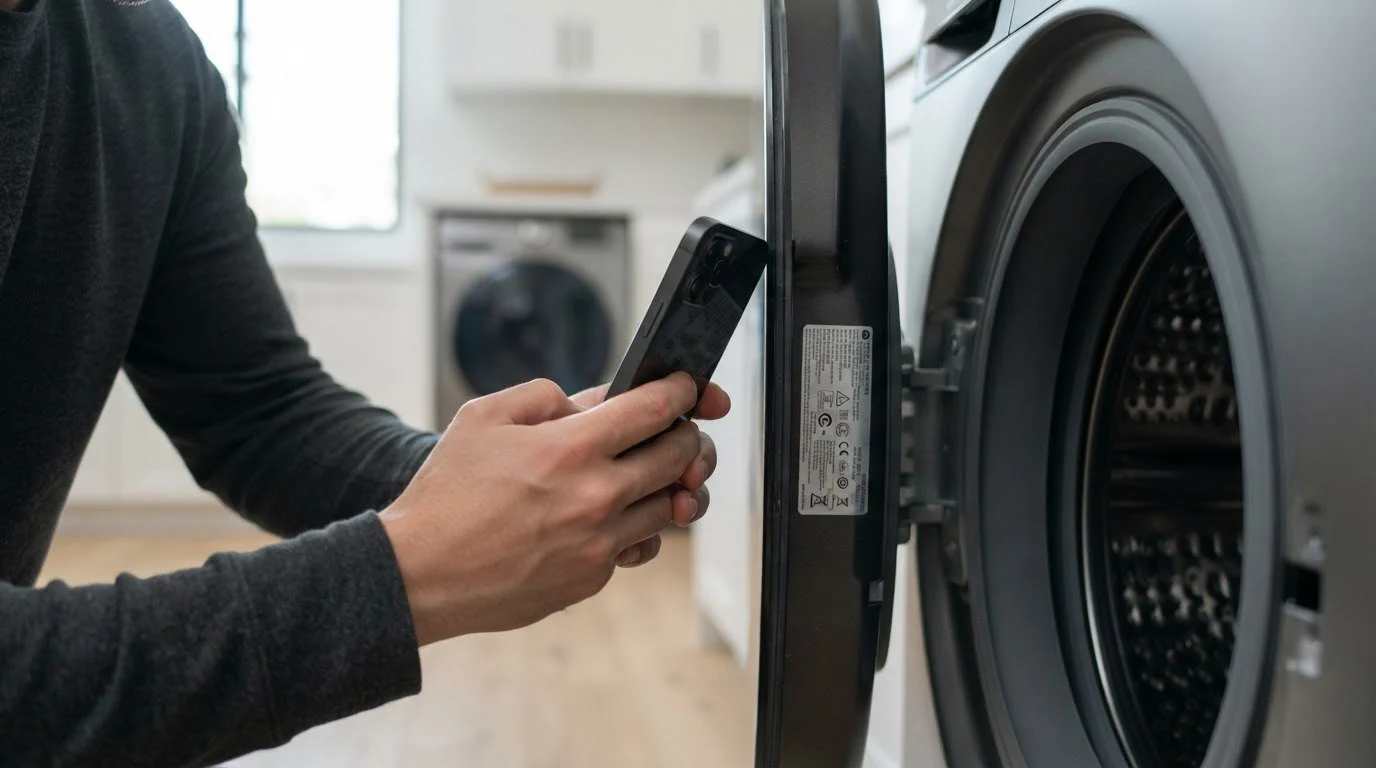
Front-load washers usually have it around the door opening, on the cabinet behind the door seal or on the rear panel. Top-load washers often show it under the lid, on the back edge, or on the cabinet rear. A WashTower has labels for both machines, so make sure you copy the one for the unit with the problem. Models like WM3090C and WT7050C are examples of what these numbers look like.
Open the door and look around the frame or the inside edge. Some are on the back. Dryers such as DLE3400 or DLG1502 carry labels with the letters DLE for electric and DLG for gas, so the model itself tells you the fuel.
Check the edge or side of the door, which becomes visible when the door is open, or the top rim of the tub. Dishwashers like LDNFC33L begin with LD, and LG Signature units such as SDNAH981 start with SD.
Ranges usually hold the label on the frame under the oven door or inside the storage drawer. Wall ovens show it on the front frame or edge. Cooktops hide it under the unit, and a surface plate or the manual may be the only accessible source. Over-the-range microwaves often list it inside the cabinet or on the side wall when the door is open.
The first letters give a clue. RF is usually a French-door refrigerator and RS a side-by-side. WF marks a front-load washer and WA a top-load one, while WD or WH can indicate a washer-dryer combo. DV starts a dryer, with DVE for electric and DVG for gas. DW indicates a dishwasher. NSG, NSI and NSY mark gas, induction and dual-fuel ranges, and ME marks an over-the-range microwave. LG also uses other prefixes that do not follow this pattern, so do not rely on the prefix alone.
Do not pull a built-in appliance out of its cabinet, tilt a heavy unit or disconnect gas, water or power to find a label. Stop if you have to do that and ask for help.
The model number tells us which codes apply, which parts and which service steps. It also lets us check the product; the models index lists those we know well. Along with the number, a short description helps: the symptom, any code, how long it has happened, and any recent change such as a move or a power cut. Our process is simple: diagnosis first, a written estimate next, and no repair without your approval. For the families we handle see services and appliances, and for error meanings browse error codes. You can also start from our contact page when you are ready to request a visit.
Three pictures are usually enough: one of the full appliance, one of the label with the text readable, and one of the display if it shows a code. Take the label photo straight on, without glare from the flash, and zoom in so every character is sharp. If the label sits in an awkward corner, a short video sweeping across it often works better than a still photo.
Landlords and property managers with many flats can save time by keeping a simple list: the unit, the appliance type, the model number and the date it was last serviced. When a tenant reports a problem, pull the entry and include it in the request. Building the list takes a short walk through each unit once, and it helps whenever an appliance misbehaves later.
No. The model number identifies the design, while the serial number identifies your individual unit. A technician may ask for both.
Take a clear photo with a flashlight and send it along. A photo of the appliance and its features also helps narrow down the model.
Sometimes. It can mark a finish or a minor variation, so copy the whole string as printed.
On connected appliances the app may show product details, which can include the model. Check the settings or product info for your appliance.
Yes. Even basic issues can differ by model, so it keeps the diagnosis accurate and avoids repeat visits.
Share a few details and we’ll confirm an appointment. Prefer to talk? Call us and we’ll help right away.