Written by
Marcus Lindqvist Appliance Care EditorPublished October 26, 2026
VERIFIED
Error codetE2
ApplianceDryer
Where tE2 comes from
LG says tE2 is the thermistor error you are most likely to meet when the dryer is cold. Steam options such as SteamFresh and Steam Sanitary can also bring it on, because moisture in the drum makes the duct cool down too fast. Very cold weather or poor venting may do the same when outside air flows back in through an exhaust that is open.
What the manual suggests
Clean the lint filter between loads, using warm water and a soft brush, and let it dry. Confirm that the vents are not clogged.
Outdoors, find the exhaust outlet (it may have flappers, a cage or mesh) and make sure the flappers open fully. Lint can jam them, and they should be fully open during the Air Dry cycle.
Remove any lint you can see near the exhaust.
Warm the dryer: run it empty for a few minutes on a different cycle, or select steam fresh, press more time until big or bulky shows, and start.
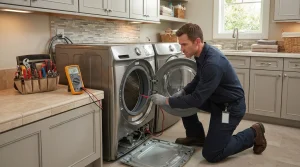
When tE2 comes back even after a reset, the dryer may require repair.
If tE2 keeps returning, ring (415) 223-7887 to discuss LG dryer repair in San Francisco or the wider Bay Area. Name the model number and the cycle that was running when it appeared.
Model compatibility: LG reuses codes across series and model years, so tE2 may mean something different on another appliance or generation. Confirm this against your model’s documentation and record your full model number before acting.
Plain language
What this code means
tE2 indicates a thermistor error, typically in cold conditions or during steam cycles.
Important safety warning. Do not attempt repairs involving electrical components, gas, water lines, refrigerant or sealed systems. Unplug the appliance if it is safe to reach the outlet, and leave internal diagnostics to a qualified technician.
Seeing this code on your LG appliance?
Book a specialist visit for a clear estimate and approval before any repair.
You submit a request with your appliance model and symptom, we confirm an appointment window, and a technician performs an on-site diagnosis. You then receive a clear estimate and decide whether to proceed before any repair begins.
Yes. We provide an upfront estimate after diagnosis. No parts are ordered or installed until you approve the work, so there are no surprise charges.
Replacement parts are selected for the exact model and confirmed with you before ordering or installation.
Service areas are listed on the Locations page. Contact us with your ZIP code to confirm current coverage for your address.
Ready to get your LG appliance working again?
Book a repair online or call us — clear estimates and approval before any repair work begins.